代码“图谱化”利器:Understand-Anything
这是一个通过多智能体(multi-agent)流水线将代码库或知识库转化为交互式知识图谱,并提供可视化看板和 AI 问答功能的 Claude Code 插件。
Understand-Anything
Understand Anything 将任意代码库、知识库或文档转化为可探索、可搜索、可对话的交互式知识图谱,支持 Claude Code、Codex、Cursor、Copilot、Gemini CLI 等多平台。
多智能体架构
/understand 命令调用 5 个 agent,/understand-domain 额外增加第 6 个:
| Agent | 职责 |
|---|---|
project-scanner |
扫描项目文件,检测语言和框架 |
file-analyzer |
提取代码结构(函数、类和导入),生成图节点和边 |
architecture-analyzer |
识别架构层 |
tour-builder |
生成引导式学习路径 |
graph-reviewer |
验证图的完整性和引用完整性 |
domain-analyzer |
提取业务领域、流程和处理步骤(由 /understand-domain 使用) |
article-analyzer |
从 wiki 文章中提取实体、论断和隐式关系(由 /understand-knowledge 使用) |
文件分析器并行运行(最多 3 个并发)。支持增量更新 — 仅重新分析自上次运行以来发生更改的文件。
安装 Understand-Anything 插件
在 Claude Code 中运行以下命令
注册插件市场
/plugin marketplace add Lum1104/Understand-Anything
安装插件
/plugin install understand-anything
重新加载插件
/reload-plugins
分析您的代码库
分析您的代码库,生成交互式知识图谱,用于理解系统架构、组件及组件间关联关系,构建知识图谱保存至.understand-anything/knowledge-graph.json 。
生成知识图谱
在 Claude Code 中运行以下命令:
/understand
接下来,会引导您完成以下步骤:
◻ 扫描项目文件
◻ 创建 .understandignore 配置
◻ 分析文件批次
◻ 构建架构层和导览
◻ 验证并保存知识图谱
完成后,您将获得一个包含项目概览、文件分析、图谱数据和导览步骤的总结报告,以及生成的知识图谱文件路径。
⏺ 完美!知识图谱分析已全部完成。让我为您总结一下结果:

  知识图谱构建完成!

  项目概览

  - 项目名称: tank-game
  - 项目描述: 一个基于 HTML5 Canvas 和原生 JavaScript 开发的经典坦克游戏克隆

  文件分析

  - 总计分析文件: 22 个
    - 代码文件: 11 个
    - 配置文件: 4 个
    - 文档文件: 7 个

  图谱数据

  - 节点: 22 个(file: 11, config: 4, document: 7)
  - 边: 21 条(imports: 1, depends_on: 9, deploys: 1, configures: 3, documents: 5, tested_by: 2)
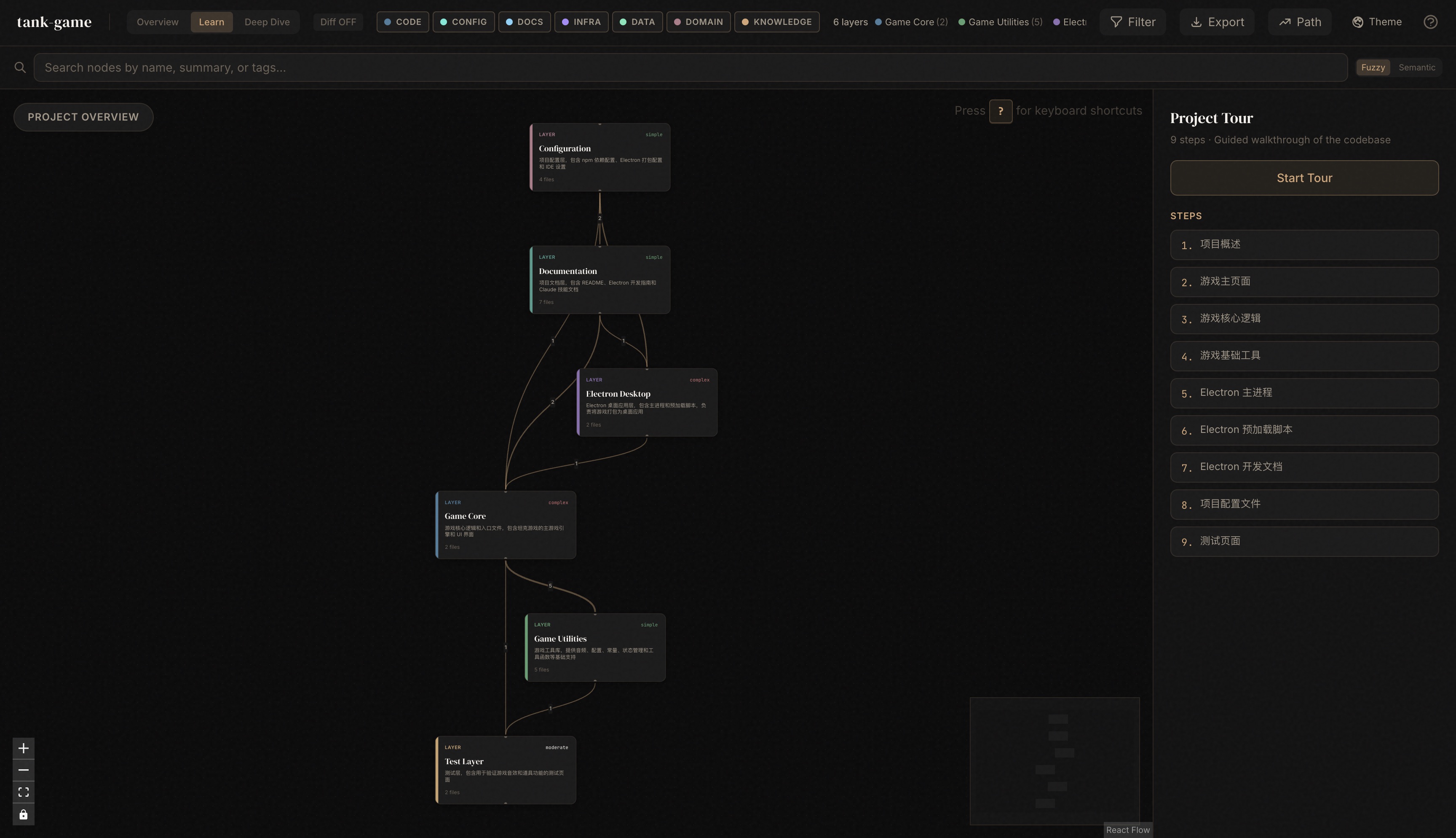
  - 架构层: 6 个
    - Game Core(游戏核心)
    - Game Utilities(游戏工具)
    - Electron Desktop(桌面应用)
    - Test Layer(测试层)
    - Configuration(配置层)
    - Documentation(文档层)
  - 导览步骤: 9 个

  知识图谱位置

  /Users/junjian/GitHub/wang-junjian/tank-game/.understand-anything/knowledge-graph.json
知识图谱(knowledge-graph.json)
{
  "version": "1.0.0",
  "project": {
    "name": "tank-game",
    "languages": ["html", "javascript", "json", "markdown", "yaml"],
    "frameworks": ["Electron", "Electron-builder"],
    "description": "一个基于 HTML5 Canvas 和原生 JavaScript 开发的经典坦克游戏克隆,致敬任天堂的《坦克大战》(Battle City)。",
    "analyzedAt": "2026-04-18T00:00:00.000Z",
    "gitCommitHash": ""
  },
  "nodes": [
    {"id": "config:.claude/settings.json", "type": "config", "name": "settings.json", "filePath": ".claude/settings.json", "summary": "Claude Code 配置文件,定义项目的工作目录和工具权限设置。", "tags": ["configuration", "claude-code", "ide-settings"], "complexity": "simple"},
    {"id": "config:.claude/settings.local.json", "type": "config", "name": "settings.local.json", "filePath": ".claude/settings.local.json", "summary": "Claude Code 本地配置文件,可能包含本地环境特定设置。", "tags": ["configuration", "local-settings", "claude-code"], "complexity": "simple"},
    {"id": "document:.claude/skills/debug-issue.md", "type": "document", "name": "debug-issue.md", "filePath": ".claude/skills/debug-issue.md", "summary": "问题调试技能文档,提供调试代码问题的指导和最佳实践。", "tags": ["documentation", "debugging", "skill-guide"], "complexity": "simple"},
    {"id": "document:.claude/skills/explore-codebase.md", "type": "document", "name": "explore-codebase.md", "filePath": ".claude/skills/explore-codebase.md", "summary": "代码库探索技能文档,指导如何浏览和理解项目结构。", "tags": ["documentation", "code-exploration", "skill-guide"], "complexity": "simple"},
    {"id": "document:.claude/skills/refactor-safely.md", "type": "document", "name": "refactor-safely.md", "filePath": ".claude/skills/refactor-safely.md", "summary": "安全重构技能文档,提供重构代码的最佳实践和方法。", "tags": ["documentation", "refactoring", "skill-guide"], "complexity": "simple"},
    {"id": "document:.claude/skills/review-changes.md", "type": "document", "name": "review-changes.md", "filePath": ".claude/skills/review-changes.md", "summary": "代码变更审查技能文档,指导如何审查代码修改和拉取请求。", "tags": ["documentation", "code-review", "skill-guide"], "complexity": "simple"},
    {"id": "document:ELECTRON.md", "type": "document", "name": "ELECTRON.md", "filePath": "ELECTRON.md", "summary": "Electron 桌面应用开发指南,包含安装、开发模式、打包等详细说明。", "tags": ["documentation", "electron", "desktop-app"], "complexity": "moderate"},
    {"id": "document:README.md", "type": "document", "name": "README.md", "filePath": "README.md", "summary": "项目主文档,包含功能特性、操作说明、快速开始指南和技术栈介绍。", "tags": ["documentation", "entry-point", "project-overview"], "complexity": "complex"},
    {"id": "config:electron-builder.yml", "type": "config", "name": "electron-builder.yml", "filePath": "electron-builder.yml", "summary": "Electron 应用打包配置文件,定义多平台构建选项和应用元数据。", "tags": ["configuration", "electron-builder", "packaging"], "complexity": "moderate"},
    {"id": "file:electron/main/index.js", "type": "file", "name": "index.js", "filePath": "electron/main/index.js", "summary": "Electron 主进程代码,处理窗口创建、菜单管理、快捷键和应用生命周期。", "tags": ["electron", "main-process", "desktop-app"], "complexity": "complex"},
    {"id": "file:electron/preload/index.js", "type": "file", "name": "index.js", "filePath": "electron/preload/index.js", "summary": "Electron 预加载脚本,在渲染进程中安全暴露主进程 API。", "tags": ["electron", "preload", "security"], "complexity": "simple"},
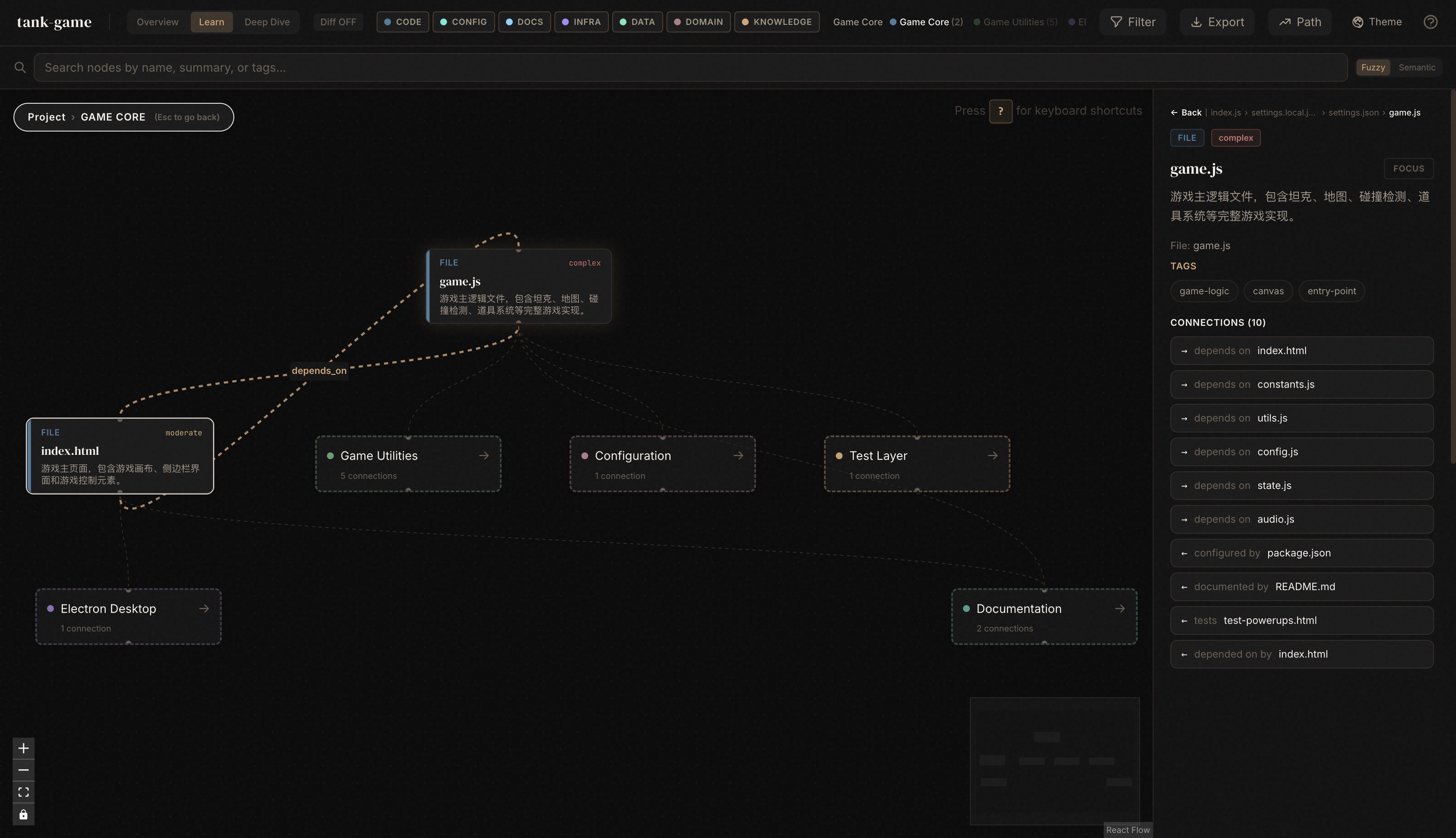
    {"id": "file:game.js", "type": "file", "name": "game.js", "filePath": "game.js", "summary": "游戏主逻辑文件,包含坦克、地图、碰撞检测、道具系统等完整游戏实现。", "tags": ["game-logic", "canvas", "entry-point"], "complexity": "complex"},
    {"id": "file:index.html", "type": "file", "name": "index.html", "filePath": "index.html", "summary": "游戏主页面,包含游戏画布、侧边栏界面和游戏控制元素。", "tags": ["ui", "entry-point", "markup"], "complexity": "moderate"},
    {"id": "config:package.json", "type": "config", "name": "package.json", "filePath": "package.json", "summary": "npm 项目配置文件,定义依赖包、脚本命令和项目元数据。", "tags": ["configuration", "npm", "build-system"], "complexity": "simple"},
    {"id": "document:public/ICONS.md", "type": "document", "name": "ICONS.md", "filePath": "public/ICONS.md", "summary": "图标资源说明文档,描述项目使用的图标来源和使用许可。", "tags": ["documentation", "assets", "icons"], "complexity": "simple"},
    {"id": "file:src/audio.js", "type": "file", "name": "audio.js", "filePath": "src/audio.js", "summary": "音频系统模块,使用 Web Audio API 实时生成游戏音效。", "tags": ["audio", "web-audio-api", "utility"], "complexity": "moderate"},
    {"id": "file:src/config.js", "type": "file", "name": "config.js", "filePath": "src/config.js", "summary": "游戏配置模块,定义玩家、敌人、道具、地图等可配置参数。", "tags": ["game-config", "settings", "utility"], "complexity": "simple"},
    {"id": "file:src/constants.js", "type": "file", "name": "constants.js", "filePath": "src/constants.js", "summary": "游戏常量定义模块,包含尺寸、方向、地图元素类型、道具类型等常量。", "tags": ["constants", "game-definitions", "utility"], "complexity": "simple"},
    {"id": "file:src/state.js", "type": "file", "name": "state.js", "filePath": "src/state.js", "summary": "游戏状态管理模块,管理游戏的全局状态变量。", "tags": ["state-management", "game-state", "utility"], "complexity": "simple"},
    {"id": "file:src/utils.js", "type": "file", "name": "utils.js", "filePath": "src/utils.js", "summary": "游戏工具函数模块,提供碰撞检测和随机数生成等通用功能。", "tags": ["utility", "collision-detection", "helpers"], "complexity": "simple"},
    {"id": "file:test-audio.html", "type": "file", "name": "test-audio.html", "filePath": "test-audio.html", "summary": "音频系统测试页面,用于验证和调试游戏音效功能。", "tags": ["test", "audio", "markup"], "complexity": "simple"},
    {"id": "file:test-powerups.html", "type": "file", "name": "test-powerups.html", "filePath": "test-powerups.html", "summary": "道具系统测试页面,用于验证和调试游戏道具功能。", "tags": ["test", "powerups", "markup"], "complexity": "moderate"}
  ],
  "edges": [
    {"source": "file:src/utils.js", "target": "file:src/constants.js", "type": "imports", "direction": "forward", "weight": 0.7},
    {"source": "file:game.js", "target": "file:index.html", "type": "depends_on", "direction": "forward", "weight": 0.6},
    {"source": "file:game.js", "target": "file:src/constants.js", "type": "depends_on", "direction": "forward", "weight": 0.6},
    {"source": "file:game.js", "target": "file:src/utils.js", "type": "depends_on", "direction": "forward", "weight": 0.6},
    {"source": "file:game.js", "target": "file:src/config.js", "type": "depends_on", "direction": "forward", "weight": 0.6},
    {"source": "file:game.js", "target": "file:src/state.js", "type": "depends_on", "direction": "forward", "weight": 0.6},
    {"source": "file:game.js", "target": "file:src/audio.js", "type": "depends_on", "direction": "forward", "weight": 0.6},
    {"source": "file:electron/main/index.js", "target": "file:index.html", "type": "deploys", "direction": "forward", "weight": 0.7},
    {"source": "file:electron/main/index.js", "target": "file:electron/preload/index.js", "type": "depends_on", "direction": "forward", "weight": 0.6},
    {"source": "config:package.json", "target": "file:electron/main/index.js", "type": "configures", "direction": "forward", "weight": 0.6},
    {"source": "config:package.json", "target": "file:game.js", "type": "configures", "direction": "forward", "weight": 0.6},
    {"source": "config:electron-builder.yml", "target": "file:electron/main/index.js", "type": "configures", "direction": "forward", "weight": 0.6},
    {"source": "config:electron-builder.yml", "target": "config:package.json", "type": "depends_on", "direction": "forward", "weight": 0.6},
    {"source": "document:README.md", "target": "file:index.html", "type": "documents", "direction": "forward", "weight": 0.5},
    {"source": "document:README.md", "target": "file:game.js", "type": "documents", "direction": "forward", "weight": 0.5},
    {"source": "document:README.md", "target": "config:package.json", "type": "documents", "direction": "forward", "weight": 0.5},
    {"source": "document:ELECTRON.md", "target": "file:electron/main/index.js", "type": "documents", "direction": "forward", "weight": 0.5},
    {"source": "document:ELECTRON.md", "target": "config:electron-builder.yml", "type": "documents", "direction": "forward", "weight": 0.5},
    {"source": "file:test-audio.html", "target": "file:src/audio.js", "type": "tested_by", "direction": "forward", "weight": 0.5},
    {"source": "file:test-powerups.html", "target": "file:game.js", "type": "tested_by", "direction": "forward", "weight": 0.5},
    {"source": "file:index.html", "target": "file:game.js", "type": "depends_on", "direction": "forward", "weight": 0.7}
  ],
  "layers": [
    {
      "id": "layer:game-core",
      "name": "Game Core",
      "description": "游戏核心逻辑和入口文件,包含坦克游戏的主游戏引擎和 UI 界面",
      "nodeIds": ["file:game.js", "file:index.html"]
    },
    {
      "id": "layer:game-utils",
      "name": "Game Utilities",
      "description": "游戏工具库,提供音频、配置、常量、状态管理和工具函数等基础支持",
      "nodeIds": ["file:src/audio.js", "file:src/config.js", "file:src/constants.js", "file:src/state.js", "file:src/utils.js"]
    },
    {
      "id": "layer:electron",
      "name": "Electron Desktop",
      "description": "Electron 桌面应用层,包含主进程和预加载脚本,负责将游戏打包为桌面应用",
      "nodeIds": ["file:electron/main/index.js", "file:electron/preload/index.js"]
    },
    {
      "id": "layer:test",
      "name": "Test Layer",
      "description": "测试层,包含用于验证游戏音效和道具功能的测试页面",
      "nodeIds": ["file:test-audio.html", "file:test-powerups.html"]
    },
    {
      "id": "layer:config",
      "name": "Configuration",
      "description": "项目配置层,包含 npm 依赖配置、Electron 打包配置和 IDE 设置",
      "nodeIds": ["config:.claude/settings.json", "config:.claude/settings.local.json", "config:electron-builder.yml", "config:package.json"]
    },
    {
      "id": "layer:documentation",
      "name": "Documentation",
      "description": "项目文档层,包含 README、Electron 开发指南和 Claude 技能文档",
      "nodeIds": ["document:.claude/skills/debug-issue.md", "document:.claude/skills/explore-codebase.md", "document:.claude/skills/refactor-safely.md", "document:.claude/skills/review-changes.md", "document:ELECTRON.md", "document:README.md", "document:public/ICONS.md"]
    }
  ],
  "tour": [
    {
      "order": 1,
      "title": "项目概述",
      "description": "从 README.md 开始了解这个坦克大战游戏的全貌。这是一个基于 HTML5 Canvas 和原生 JavaScript 开发的经典坦克游戏克隆,支持 Electron 桌面应用打包。README 详细介绍了桌面应用特性、核心玩法和操作说明,为我们的代码探索之旅提供了路线图。",
      "nodeIds": ["document:README.md"]
    },
    {
      "order": 2,
      "title": "游戏主页面",
      "description": "index.html 是游戏的入口页面,包含游戏画布、侧边栏界面和游戏控制元素。它承载了整个游戏的 UI 结构,包括对称的左右侧边栏设计,左侧显示游戏简介和玩法,右侧显示游戏状态。这个页面直接依赖 game.js 来实现游戏功能。",
      "nodeIds": ["file:index.html"]
    },
    {
      "order": 3,
      "title": "游戏核心逻辑",
      "description": "game.js 是整个项目的核心,包含坦克、地图、碰撞检测、道具系统等完整游戏实现。它是被依赖最多的文件(fan-in 排名第一),同时也依赖了最多的工具模块(fan-out 排名第一),是理解游戏运行机制的关键。",
      "nodeIds": ["file:game.js"]
    },
    {
      "order": 4,
      "title": "游戏基础工具",
      "description": "这五个模块构成了游戏的基础设施层,为 game.js 提供必要的支持。constants.js 定义游戏常量,config.js 提供可配置参数,state.js 管理全局状态,utils.js 实现碰撞检测等工具函数,audio.js 使用 Web Audio API 实时生成游戏音效。",
      "nodeIds": ["file:src/constants.js", "file:src/config.js", "file:src/state.js", "file:src/utils.js", "file:src/audio.js"]
    },
    {
      "order": 5,
      "title": "Electron 主进程",
      "description": "electron/main/index.js 是 Electron 桌面应用的主进程代码,负责窗口创建、菜单管理、快捷键和应用生命周期管理。它启动时会自动最大化窗口以提供沉浸式游戏体验,并创建原生菜单栏支持游戏控制、视图调整和帮助功能。",
      "nodeIds": ["file:electron/main/index.js"]
    },
    {
      "order": 6,
      "title": "Electron 预加载脚本",
      "description": "electron/preload/index.js 在渲染进程中安全暴露主进程 API,是 Electron 安全模型的重要组成部分。它作为主进程和渲染进程之间的桥梁,确保游戏代码可以安全地与桌面系统功能交互。",
      "nodeIds": ["file:electron/preload/index.js"]
    },
    {
      "order": 7,
      "title": "Electron 开发文档",
      "description": "ELECTRON.md 提供了完整的桌面应用开发指南,包含安装、开发模式、打包等详细说明。对于想要深入了解如何将 Web 游戏打包为跨平台桌面应用的开发者来说,这是一份重要的参考资料。",
      "nodeIds": ["document:ELECTRON.md"]
    },
    {
      "order": 8,
      "title": "项目配置文件",
      "description": "package.json 定义了 npm 依赖包、脚本命令和项目元数据,而 electron-builder.yml 则配置了 Electron 应用的多平台构建选项和应用元数据。这两个文件共同构成了项目的构建和打包系统。",
      "nodeIds": ["config:package.json", "config:electron-builder.yml"],
      "languageLesson": "electron-builder.yml 支持多平台构建配置,可以为 Windows、macOS 和 Linux 分别设置不同的打包选项,包括图标、安装程序格式、自动更新等功能。"
    },
    {
      "order": 9,
      "title": "测试页面",
      "description": "项目包含两个专门的测试页面:test-audio.html 用于验证和调试游戏音效功能,test-powerups.html 用于测试道具系统。这些测试页面帮助开发者在不启动完整游戏的情况下验证核心功能模块。",
      "nodeIds": ["file:test-audio.html", "file:test-powerups.html"]
    }
  ]
}
可视化知识图谱
在 Claude Code 中运行以下命令:
/understand-dashboard
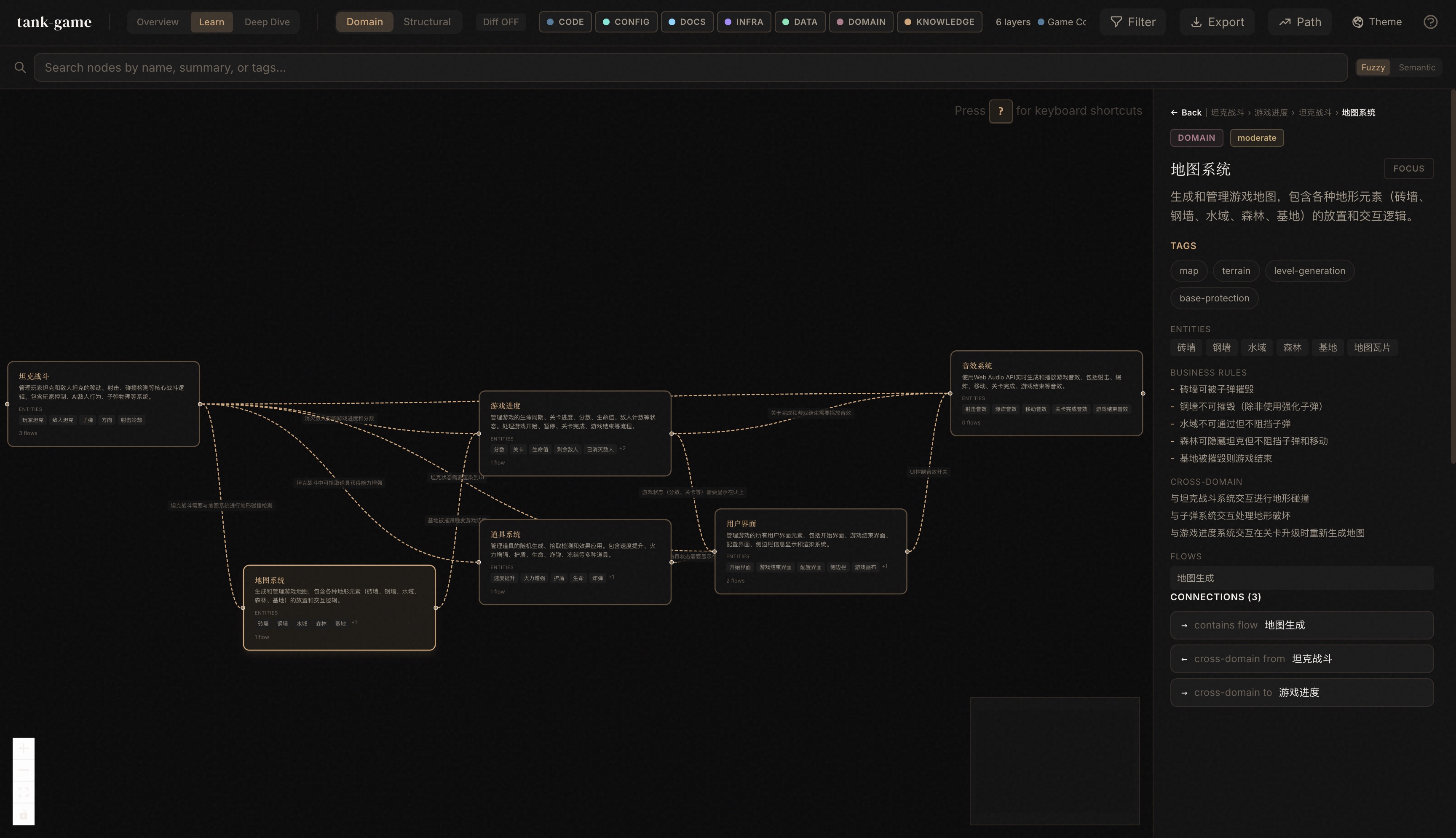
提取业务领域知识(领域、流程、步骤)
在 Claude Code 中运行以下命令:
/understand-domain 本项目中游戏的工作原理
其他命令示例
# 询问任意代码库的问题
/understand-chat How does the payment flow work?

# 分析当前修改的影响
/understand-diff

# 深入理解某个文件
/understand-explain src/auth/login.ts

# 为新团队成员生成指南
/understand-onboard

# 提取业务领域知识(领域、流程、步骤)
/understand-domain

# 分析 Karpathy 模式的 LLM Wiki 知识库
/understand-knowledge ~/path/to/wiki